最新のアドオン
同期と編集 追加日
このMediaMonkeyアドオンは、アルバム内のすべてのトラックのDateAddedを、アルバムの初回再生日に基づいて更新します。
バージョン
現在のバージョン:1.2.0
特徴
保存する前に目標値を確認・調整するためのダイアログが開きます
再生されたアルバムの初期値および最大値として、アルバムの初回再生日を使用します。
現在の日時を許容上限として使用することで、未再生アルバムをサポートします。
未再生アルバムの現在の日時を設定するボタンを提供します。
必要なコンテンツ幅に応じて、コンパクトレイアウトまたはワイドレイアウトで開きます。
アルバム内のすべてのトラックのDateAddedをデータベースに書き込み、その後MediaMonkeyタグの同期をトリガーします。
複数のアルバムをミックスして選択した場合、最初のアルバムのみを処理し、通知を表示します。
行動
最初に選択されたトラックにアルバムがない場合、アクションはキャンセルされます。
再生済みのアルバムの場合、エディターは最初の再生日があらかじめ選択された状態で開きます。
未再生アルバムの場合、エディターは現在のDateAdded値または現在の日時で開きます。
将来の日付や許容限度を超える値など、無効な値はブロックされます。
メニュー項目
メニュー項目は「タグの編集」からアクセスできます。
Sync&Edit DateAdded
Hide original
This MediaMonkey addon updates DateAdded for all tracks in an album based on the album's first play date.
Version
Current version: 1.2.0
Features
opens a dialog to review and adjust the target value before saving
uses the album's first play date as the initial and maximum value for played albums
supports unplayed albums by using the current date and time as the allowed upper limit
provides a button to set the current date and time for unplayed albums
opens with compact or wide layout depending on required content width
writes DateAdded for all tracks in the album to the database and then triggers MediaMonkey tag syncing
processes only the first album in a mixed multi-selection and shows a notice
Behavior
if the first selected track has no album, the action is canceled
for played albums, the editor opens with the first play date preselected
for unplayed albums, the editor opens with the current DateAdded value or the current date and time
invalid values such as future dates or values after the allowed limit are blocked
Menu Entry
The menu entry is available under Edit Tags.
By
AI (inspired by Fetzenschaedl)
提出者 fetzenschaedl
更新 25/03/2026

MatchMonkey は、音楽の発見とプレイリスト作成体験を向上させるために設計された、多用途で強力な MediaMonkey 5 アドオンです。アーティスト、トラック、ジャンル、ムード、アクティビティに基づく検索など、複数の検索モードを統合し、last.fm API と ReccoBeats.com を活用して、ライブラリに似た音楽や、気分やアクティビティに合わせた音楽を検索します。
MatchMonkey は、インテリジェントなマルチパスファジーマッチングにより、ローカルライブラリ内のトラックを正確に識別し、高品質なマッチングを実現します。高度なフィルタリング、人気度によるランキング、ランダム化オプションにより、プレイリストを好みに合わせてカスタマイズできます。このアドオンは、新しいプレイリストの作成、既存のプレイリストの上書き、またはトラックを「Now Playing」に直接追加するなど、柔軟なプレイリスト管理をサポートします。
MatchMonkeyには、プレイリストの終わりに近づくと類似のトラックを自動的に追加し、シームレスでエンドレスな再生を可能にする自動キューモードも搭載されています。パフォーマンスの最適化とキャッシュにより、リスニングを中断することなくスムーズな操作を実現します。
MediaMonkey 5 内でダイナミックでパーソナライズされた音楽探索と継続的な再生を求めるユーザーに最適な MatchMonkey は、強力な API とスマートなアルゴリズムを組み合わせて、楽で魅力的なリスニング体験を提供します。
サポートとアップデートについては、GitHub リポジトリにアクセスし、Ko-fi でプロジェクトをサポートすることを検討してください。
主な特徴
- スマート ディスカバリー: 選択したトラックまたは現在再生中の音楽に基づいて、類似のアーティスト、トラック、ジャンル、音響を Last.fm または ReccoBeats で検索します。
- プレイリストの作成: プレイリストまたは「Now Playing」へのエンキューを作成するための高度なオプション
- インテリジェントマッチング:高度なマルチパスファジーマッチングにより、ローカルライブラリ内のトラックを高精度に検索します。
- 柔軟な出力: 新しいプレイリストを作成したり、既存のプレイリストを上書きしたり、トラックを「再生中」に直接キューに追加したりできます。
- 自動キューモード: プレイリストの最後に近づくと、類似のトラックを自動的にキューに追加して、音楽をエンドレスに再生します。
- ランキングシステム: Last.fm の人気ランキングを使用して、人気のトラックを優先します
- ランダム化: 結果をシャッフルして、さまざまなリスニング体験を提供できます
- 見逃したおすすめリスト: 地元の図書館に所蔵されていないおすすめリストを取得します
アップデート: https://github.com/remo-imparato/MatchMonkey/releases
MatchMonkey is a versatile and powerful MediaMonkey 5 add-on designed to enhance your music discovery and playlist creation experience. It integrates multiple discovery modes—including artist, track, genre, mood, and activity-based searches—leveraging the last.fm API and ReccoBeats.com to find music similar to your library or tailored to your mood and activities.
With intelligent multi-pass fuzzy matching, MatchMonkey accurately identifies tracks in your local library, ensuring high-quality matches. Advanced filtering, ranking by popularity, and randomization options allow you to customize playlists to your preferences. The add-on supports flexible playlist management, including creating new playlists, overwriting existing ones, or directly queuing tracks to Now Playing.
MatchMonkey also features an auto-queue mode for seamless, endless playback by automatically adding similar tracks as your playlist nears its end. Performance optimizations and caching ensure smooth operation without interrupting your listening.
Ideal for users seeking dynamic, personalized music exploration and continuous playback within MediaMonkey 5, MatchMonkey combines powerful APIs and smart algorithms to deliver an effortless and engaging listening experience.
For support and updates, visit the GitHub repository and consider supporting the project on Ko-fi.
Key Features
Hide original
- Smart Discovery: Query Last.fm or ReccoBeats for similar artists, tracks, genre, or acoustics based on selected tracks or currently playing music
- Playlist Creation: Advanced options for creating playlists or enques to Now Playing
- Intelligent Matching: Advanced multi-pass fuzzy matching finds tracks in your local library with high accuracy
- Flexible Output: Create new playlists, overwrite existing ones, or queue tracks directly to Now Playing
- Auto-Queue Mode: Endless music by automatically queueing similar tracks when approaching the end of your playlist
- Ranking System: Prioritize popular tracks using Last.fm's popularity rankings
- Randomization: Optionally shuffle results for varied listening experiences
- Missed Recommendation List: Get a listing of the recommendations that you do not have in your local library
Updates: https://github.com/remo-imparato/MatchMonkey/releases
By
rimparato
提出者 rimparato
更新 08/04/2026
バージョン履歴 / 詳細
- バージョン:
- 2.2.8
- 更新:
- 08/04/2026
- Size:
- 235.93 KB
- ライセンス:
- Dual MIT/Commercial
- 対応機種:
- Media Monkey 5.0.0
- 変更点:
## **Version 2.2.8 Release Notes**
### **? Summary**
This update introduces **enhanced discovery capabilities**, **expanded mood/activity options**, and **improved caching & filtering** to create more personalized playlists from your library.---
### **✨ New Features**
#### **Playlist Naming System**
- **New flexible template system** with `%action%` and `%seed%` placeholders
- `%action%` shows what kind of search (Artists, Tracks, Genres, mood, or activity)
- `%seed%` displays the seed summary (artist/genre names)
- Default template: `Similar %action% (%seed%)`
- Custom examples: "My %action% Mix - %seed%" → "My Artists Mix - The Beatles, Pink Floyd"
- Legacy `%` placeholder still works for backwards compatibility#### **Expanded Mood & Activity Options**
- **New activities**: High Energy, HIIT, Hype Sports, Gaming, Focus Work, Getting Ready, Evening Winddown, Road Trip, Yoga, Cleaning, Cooking, Driving
- **All existing moods** now available with refined audio profiles#### **API Filtering & Thresholds**
- **Unified API Min Match setting** (0-99.99%) filters recommendations from both Last.fm and ReccoBeats based on match/popularity scores
- Helps eliminate lower-quality recommendations and focus on better matches#### **Enhanced Audio Format Control**
- **Audio format preference dropdown**:
- Mixed (all formats) — prioritize highest bitrate
- Lossless only — FLAC/APE/WAV/ALAC/WavPack
- Lossy only — MP3/OGG/AAC/WMA#### **API Response Caching**
- **Persistent cache** survives MediaMonkey restarts
- **Configurable TTL** (cache expiry in hours)
- **Clear Cache button** in options for manual reset
- **Storage usage display** shows breakdown by feature (Last.fm, ReccoBeats, Missed Results)#### **Missed Results Tracking (Enhanced)**
- Now stores results in **SQLite database** for better reliability
- **Persistent storage** across restarts
- **Real-time updates** while dialog is open
- Improved database schema for scalability---
### **? Improvements**
- **Better track matching** with support for multiple artists with the same name
- **Optimized Last.fm API calls** with centralized rate limiting
- **Automatic config upgrade** for old playlist naming templates
- **Enhanced seed expansion** when using mood/activity discovery
- **More granular control** over discovery limits and thresholds
- バージョン:
- 2.2.5
- 更新:
- 15/03/2026
- Size:
- 206.8 KB
- ライセンス:
- Dual MIT/Commercial
- 対応機種:
- Media Monkey 5.0.0
- 変更点:
Better Playlist name generation to show the seed criteria used
Improved Reccobeats.com usage where each individual track is used for similar music, not an averaged accusitics profile.
- バージョン:
- 2.2.2
- 更新:
- 13/02/2026
- Size:
- 203.83 KB
- ライセンス:
- Dual MIT/Commercial
- 対応機種:
- Media Monkey 5.0.0
- 変更点:
- ? **Smart Discovery**: Query Last.fm for similar artists or similar tracks based on selected or currently-playing music
- ? **Mood & Activity Playlists**: Use ReccoBeats audio profiles for moods/activities—best results are obtained when seed tracks are relevant
- ? **Search by Track, Artist, Genre & Acoustics**: Search by track title, by artist, by genre/tags, or use ReccoBeats "acoustics" recommendations to discover matching tracks in your library
- ? **Intelligent Matching**: Multi-pass fuzzy matching finds tracks in your local library (exact → normalized → partial)
- ? **Flexible Output**: Create new playlists, overwrite existing ones, or queue tracks directly to Now Playing
- ? **Auto-Queue / Endless music**: Auto-mode can automatically queue similar tracks when Now Playing is nearing the end
- ? **Randomization**: Optionally shuffle results for variety
- ?️ **Save Missed Recommendations**: Copy the list of tracks that were highly recommended but not matched
- バージョン:
- 2.1.1
- 更新:
- 02/02/2026
- Size:
- 194.5 KB
- ライセンス:
- Dual MIT/Commercial
- 対応機種:
- Media Monkey 5.0.0
- 変更点:
- Added ReccoBeats integration (new API module, mood/activity presets, blending logic).
- Core discovery and orchestration updates, including improved error handling and progress feedback.
- Auto‑Queue improvements (configurable thresholds, seed logic, duplicate handling).
- UI and options panel refinements (MatchMonkey settings).
- Documentation overhaul and new end‑user guides.
- バージョン:
- 2.0.14
- 更新:
- 26/01/2026
- Size:
- 1.45 MB
- ライセンス:
- Dual MIT/Commercial
- 対応機種:
- Media Monkey 5.0.0
- 変更点:
• Smarter Auto Mode: higher default tracks-per-artist, tightened default limits, and improved discovery logic so automatic playlists are more reliable.
• Resilient auto-queue: multi-mode fallback keeps the queue populated when the primary discovery mode returns few results.
• Last.fm integration improved: API calls now use the correct seed/track limits for artists and genres; API key handling and the settings UI made more robust and user-friendly.
• Better track handling: more accurate track additions and automatic playback restart when the queue changes.
• Revised filters and minor UI/config tweaks for a cleaner configuration experience.
- バージョン:
- 2.0.3
- 更新:
- 24/01/2026
- Size:
- 1.44 MB
- ライセンス:
- Dual MIT/Commercial
- 対応機種:
- Media Monkey 5.0.0
- 変更点:
Port from SimilarArtists with UI and feature updates. If you have SimilarArtists, remove it and add MatchMonkey to avoid menu confusion

このMediaMonkeyアドオンは、トラックの詳細なオーディオ特性を自動的に取得・保存することで、音楽コレクションを強化します。ReccoBeatsのオーディオ特性データベースとSpotifyとの連携(オプション)により、トラックマッチングを強化し、メタデータにプロフェッショナルなオーディオ特性を付加します。
包括的なオーディオ特徴検索
- BPM(テンポ) :DJミキシングやワークアウトプレイリストに最適な正確な1分あたりのビート数
- 音楽キー: ハーモニックミキシングのためのトラックのキーシグネチャ
- ダンス適性:トラックがダンスに適しているかどうか(0~100%)
- エネルギー:トラックの強度とパワー(0~100%)
- 価値:トラックの音楽的なポジティブさ/ムード(0-100%)
- 音響性:アコースティック楽器と電子楽器の信頼性の尺度(0~100%)
- 楽器演奏度: トラックにボーカルが含まれていない可能性 (0-100%)
スマートな統合
- ReccoBeats 検索: 認証情報なしですぐに使えますが、正確なトラック メタデータが必要です - トラックを正しく識別するには、アーティスト、タイトル、アルバムが公式リリース情報と完全に一致している必要があります
- オプションの Spotify 検索: 精度向上のために推奨 - Spotify の包括的なデータベースとあいまい検索機能を使用した強化されたトラックマッチング
- デュアル検索オプション: トラック識別にReccoBeats(設定不要、厳密なマッチング)またはSpotify(より良い結果、インテリジェントなマッチング)を選択します。
- ReccoBeatsオーディオ機能: ReccoBeatsデータベースから事前に分析されたオーディオ機能を取得します
- 2段階のプロセス:Spotifyの優れた検索機能を使用してトラックを識別し、ReccoBeatsからオーディオ機能を取得します。
- 柔軟な構成:保存するオーディオ機能を選択
- カスタムフィールドマッピング: オーディオ機能を MediaMonkey のカスタムフィールドにマッピングします
- バッチ処理:複数のトラックを同時に処理
- エラー処理: データベースに見つからないトラックを適切に処理します
✨ セットアップ情報
推奨のSpotify検索を使用するには、このアドオンに無料のSpotify開発者アカウントが必要です。設定手順と詳細な使用方法については、 https://github.com/DrHardReset/MMAudioFeaturesをご覧ください。
⚖️ 知的財産に関する通知
- Spotify®はSpotify ABの登録商標です。
- MediaMonkey® は Ventis Media Inc. の登録商標です。
- ReccoBeatsはReccoBeatsが提供するサービスであり、その利用規約が適用されます。
このアドオンは独自に開発されており、Spotify AB、Ventis Media Inc.、ReccoBeatsとの提携、承認、スポンサー契約は一切ありません。すべての商標およびサービスマークはそれぞれの所有者に帰属します。
Translated automatically (see original)This MediaMonkey addon enhances your music collection by automatically fetching and storing detailed audio features for your tracks. Using ReccoBeats' audio feature database with optional Spotify integration for enhanced track matching, this addon enriches your metadata with professional audio characteristics.
Comprehensive Audio Feature Retrieval
- BPM (Tempo): Precise beats per minute for DJ mixing and workout playlists
- Musical Key: Track's key signature for harmonic mixing
- Danceability: How suitable a track is for dancing (0-100%)
- Energy: Intensity and power of the track (0-100%)
- Valence: Musical positivity/mood of the track (0-100%)
- Acousticness: Confidence measure of acoustic vs. electric instruments (0-100%)
- Instrumentalness: Likelihood that a track contains no vocals (0-100%)
Smart Integration
- ReccoBeats Search: Works out-of-the-box without credentials, but requires precise track metadata - Artist, Title, and Album must match official release information exactly for successful track identification
- Optional Spotify Search: Recommended for better accuracy - Enhanced track matching using Spotify's comprehensive database with fuzzy search capabilities
- Dual Search Options: Choose between ReccoBeats (no setup, strict matching) or Spotify (better results, intelligent matching) for track identification
- ReccoBeats Audio Features: Retrieves pre-analyzed audio features from ReccoBeats database
- Two-Step Process: Uses Spotify's superior search to identify tracks, then fetches audio features from ReccoBeats
- Flexible Configuration: Choose which audio features to save
- Custom Field Mapping: Maps audio features to MediaMonkey's custom fields
- Batch Processing: Process multiple tracks simultaneously
- Error Handling: Graceful handling of tracks not found in databases
✨ Setup Information
To use the reccomended Spotify search this addon requires a free Spotify Developer Account. For setup instructions and detailed usage information, visit https://github.com/DrHardReset/MMAudioFeatures
⚖️ Intellectual Property Notice
- Spotify® is a registered trademark of Spotify AB
- MediaMonkey® is a registered trademark of Ventis Media Inc.
- ReccoBeats is a service provided by ReccoBeats and subject to their terms
This addon is independently developed and is not affiliated with, endorsed by, or sponsored by Spotify AB, Ventis Media Inc., or ReccoBeats. All trademarks and service marks are the property of their respective owners.
Hide original
By
DrHardReset
提出者 drunknmonkey
更新 24/01/2026
バージョン履歴 / 詳細
- バージョン:
- 1.1
- 更新:
- 24/01/2026
- ライセンス:
- MIT
- 対応機種:
- Media Monkey 5
- 変更点:
The latest release. More information can be found on github: https://github.com/DrHardReset/MMAudioFeatures/releases/latest
- バージョン:
- 1.0.1
- 更新:
- 10/01/2026
- Size:
- 13.9 KB
- ライセンス:
- MIT
- 対応機種:
- Media Monkey 5.0
- 変更点:
More information can be found in the GitHub repository https://github.com/DrHardReset/MMAudioFeatures
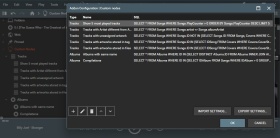
MediaMonkey 内でカスタム ノードを作成できます。 7 つのサンプル ノードが含まれていますが、MediaMonkey データベース構造を理解していれば、必要なノードを自由に作成できます。
Translated automatically (see original)Allows you to create custom nodes within MediaMonkey. 7 sample nodes are included, but you can create whatever nodes you want assuming you familiarize yourself with the MediaMonkey database structure.
Hide original
By
Ludek
提出者 rusty
更新 30/12/2025
バージョン履歴 / 詳細
- バージョン:
- 1.1.5
- 更新:
- 30/12/2025
- Size:
- 6.36 KB
- 対応機種:
- Media Monkey 5
- 変更点:
Version 1.1.5 adds a UI to save custom queries
ソースによっては、複数の CD からのオーディオブックに何百ものファイルが含まれている場合があります。
各 CD には独自のトラック番号が付けられているため、アルバム全体で同じ名前のトラックが複数存在する可能性があります。
一部のオーディオ プレーヤーにとって、正しい順序を出力するのは悪夢です。
Track Entitler は、トラック番号に基づいてトラックに自動的に名前を付ける機能のみを提供します。
プロセス
- すべてのファイルに正しい順序でトラック番号が付いていることを確認してください。
- タイトルを変更するすべてのトラックを選択します。
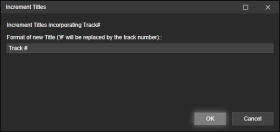
- [タグの編集] を右クリック (または [ツール] > [タグの編集]を使用) し、 [タイトルの増分]を選択します。
- 新しくタイトルを付けるトラックに追加するテキストを追加します。
文字#はトラック番号に置き換えられます。
例
追跡 #
トラック1
トラック2
トラック3
...
新月 # 102
新月 1/102
新月 102枚中2枚目
新月 102枚中3枚目
...
Depending on your source - you may have hundreds of files in an audiobook from several CDs.
Each CD its own track numbers, which means you may end up with several identically named tracks in the entire album.
A nightmare for some audio players to gifure out the correct order.Track Entitler merely offers the possiblilty to automatically name the tracks based on the track number.
Process
- Make sure all files have Track Numbers in correct, sequential order.
- Select all tracks you want re-entitled.
- Right-click Edit Tags (or use the Tools > Edit Tags), and select Increment Titles.
- Add the text that you want your newly entitled tracks to have.
The character # will be replaced by the track number.Examples
Track #
Track 1
Track 2
Track 3
...
New Moon # of 102
New Moon 1 of 102
Hide original
New Moon 2 of 102
New Moon 3 of 102
...
By
ConcernedWife
提出者 ConcernedWife
更新 08/10/2025