MediaMonkey 5 のオーディオとビデオを微調整します。Winamp 互換プラグインを含む詳細については、MediaMonkey 4/5 カテゴリを参照してください。
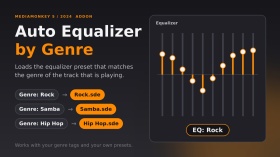
トラックのジャンルに基づいて、トラックが変更されるとイコライザープリセットが自動的に読み込まれます。プリセットは、Equalizerフォルダ内のジャンル名と完全に一致するファイル名である必要があります(例:「Rock」ジャンル → EqualizerRock.sde)。プリセットのないジャンルでは、現在のイコライザー設定が維持されます。複数のジャンル(「Rock; Pop」)がサポートされており、プリセットファイルのある最初のジャンルが使用されます。プリセットが変更されると、「EQ: Rock」という短いメッセージが表示されます。
MediaMonkey 2024.2.2.3222 (Windows) でテスト済み。DiddeLeeDoo 氏による 2006 年のスクリプト AutoEQ.vbs に着想を得ており、このアドオンは MediaMonkey 5 用にゼロから書き下ろされたオリジナルコードです。
ポルトガル語:自動カレガ プリセットは、均等化に準拠し、自動生成されます。プリセット開発者、一般的なユーザー、パスタ イコライザーの開発者です。
Translated automatically (see original)Automatically loads an equalizer preset when the track changes, based on the track’s genre. The preset must be a file named exactly like the genre inside the Equalizer folder (e.g. genre “Rock” → EqualizerRock.sde). Genres without a preset keep your current equalizer settings. Multiple genres (“Rock; Pop”) are supported: the first one with a preset file is used. A short “EQ: Rock” message shows when the preset changes.
Tested on MediaMonkey 2024.2.2.3222 (Windows). Inspired by the 2006 script AutoEQ.vbs by DiddeLeeDoo; this addon is original code written from scratch for MediaMonkey 5.
Em português: carrega automaticamente o preset do equalizador conforme o gênero da faixa. O arquivo do preset deve ter o mesmo nome do gênero, dentro da pasta Equalizer.
Hide original
By
Fernando Santos & Claude
提出者 FernandoSantos
更新 14/10/2026
バージョン履歴 / 詳細
- バージョン:
- 1.1
- 更新:
- 14/10/2026
- Size:
- 2.99 KB
- ライセンス:
- MIT (permite usar e modificar, mantendo os crédito
- 対応機種:
- Media Monkey 2024.2
- 変更点:
Version 1.1.0 - first public release.
- Automatically loads the equalizer preset that matches the track's genre (Equalizer<Genre>.sde).
- Finds the Equalizer folder on its own (no fixed paths).
- Genres without a preset keep your current EQ (the file is checked first, because loading a missing preset resets the EQ to flat).
- Multiple genres (Rock; Pop) supported: the first one with a preset is used.
- Short "EQ: <preset>" message that disappears on its own.
Tested only on MediaMonkey 2024.2.2.3222 (Windows).Versão 1.1.0 - primeira versão pública.
- Carrega automaticamente o preset do equalizador correspondente ao gênero da faixa (Equalizer<Gênero>.sde).
- Encontra a pasta Equalizer sozinho (sem caminhos fixos).
- Gêneros sem preset mantêm o seu EQ atual (o arquivo é verificado antes, pois carregar um preset inexistente zera o EQ).
- Vários gêneros (Rock; Pop): usa o primeiro que tiver preset.
- Aviso rápido "EQ: <preset>" que some sozinho.
Testado apenas no MediaMonkey 2024.2.2.3222 (Windows).
これは、MediaMonkey 5 に CD 書き込み機能が追加される前に作成されたレガシー アドオンです。
このアドオンは本来の目的には必要ありませんが、MediaMonkey 5 から MediaMonkey 4 にトラックを送信して、CD 書き込み以外のトラック操作を実行できるため、引き続き使用できます (たとえば、データ CD を書き込みたい場合や、MediaMonkey 4 でのみ使用可能なアドオンを使用してトラック操作を実行したい場合など)。
- 希望のトラックを選択します。
- 右クリックして、 [送信先] -> [CD/DVD (MM4 を使用して書き込み)] を選択します...
- すると、MM4 が開き、トラックが「現在再生中」リストに追加されます。
- 現在再生中のトラックを選択します。 [送信先] -> [CD/DVD/BD (書き込み)]... を選択して、CD 書き込みウィザードを開きます。
This is a legacy addon, created before MediaMonkey 5 included CD burning functionality.
The addon is no longer needed for its original purpose, but is still available as it allows you to send tracks from MediaMonkey 5 to MediaMonkey 4 to perform other operations on the tracks aside from CD Burning (e.g. if you wish to burn a data CD, OR perform an operation on the tracks with an addon that is only available for MediaMonkey 4).
Hide original
- Select the desired tracks.
- Right click, Send to -> CD/DVD (Burn using MM4)...
- MM4 will then open with the tracks added to the Now Playing list.
- Select the tracks in Now Playing. Send to -> CD/DVD/BD (Burn)... to open the CD burning wizard.
By
Ventis Media, Inc.
提出者 drakinite
更新 13/04/2022

MediaMonkey v5 および 2024 と互換性があります。
MediaMonkey for Windows は、システムにすでにインストールされているコーデックを使用して、ほとんどのオーディオ/ビデオ形式を再生、キャスト、またはエンコードできます。特定のコーデックがインストールされていない場合、このプラグインは次のサポートを追加します。
- aac (.m4a、.m4b)、h.264 (.mp4、.m4v、.mkv)、mpeg4 (.avi)、+ flash、.mov、mpeg の再生
- aac (.m4a)、alac、h.264 (.mp4、.mkv)、mpeg4 (.mp4、.mkv) へのエンコード/変換
- ビデオ字幕 (.srt ファイル)
試用版のコーデックは 30 日間の動作に制限されています。
Translated automatically (see original)Compatible with MediaMonkey v5 and 2024!
MediaMonkey for Windows can play, cast, or encode most audio/video formats using codecs already installed on your system. If you don't have certain codecs installed, this plugin adds support for:
- Playback of aac (.m4a, .m4b), h.264 (.mp4, .m4v, .mkv), mpeg4 (.avi), + flash, .mov, and mpeg
- Encoding/conversion to aac (.m4a), alac, h.264 (.mp4, .mkv), and mpeg4 (.mp4, .mkv)
- Video subtitles (.srt files)
Codecs in the trial version are limited to 30-days of operation.
Hide original
By
Ventis Media, Inc.
提出者 jiri
更新 23/12/2025
バージョン履歴 / 詳細
- バージョン:
- 3.0.12
- 更新:
- 23/12/2025
- ライセンス:
- Trial
- 対応機種:
- Media Monkey 5 - 2024.9
- 変更点:
This is a minor update that:
- improves m4a efficiency & support
- updates a couple of strings for clarity
- バージョン:
- 3.0.10
- 更新:
- 05/02/2025
- ライセンス:
- Trial
- 対応機種:
- Media Monkey 5.0 - 2024.9
- 変更点:
This update is required if you installed codec pack 3.0.9 which was missing the aac encoding functionality.
If you're currently on version 3.0.8, the update can be considered optional--it contains updates to the LAV filter component.
- バージョン:
- 3.0.8
- 更新:
- 05/12/2024
- ライセンス:
- Trial
- 対応機種:
- Media Monkey 5.0 - 2024.9
- 変更点:
This is a minor update and isn't required unless you experience a crash with the MediaMonkey codec 3.0.7
- Fixed crash that can occur if m4a encoding settings are corrupted
- Renamed the addon so that it's clear that it works with MMW 5 and 2024
- バージョン:
- 3.0.7
- 更新:
- 05/12/2024
- ライセンス:
- Trial
- 対応機種:
- Media Monkey 5.0 - 2024.9
- 変更点:
This is a minor update and isn't required unless you experience a crash with the MediaMonkey codec 3.0.7
- Fixed crash that can occur if m4a encoding settings are corrupted
- Renamed the addon so that it's clear that it works with MMW 5 and 2024
- バージョン:
- 3.0.7
- 更新:
- 28/08/2022
- ライセンス:
- Trial
- 対応機種:
- Media Monkey 5.0 - 5.9
- 変更点:
- ALAC conversion fix
- Updated icon
- バージョン:
- 3.0.6
- 更新:
- 09/12/2021
- ライセンス:
- Trial
- 対応機種:
- Media Monkey 5.0 - 5.9
- 変更点:
- Updated lav filter
- Fixed crash with malformed m4a files
- バージョン:
- 3.0.5
- 更新:
- 26/02/2021
- ライセンス:
- Trial
- 対応機種:
- Media Monkey 5.0 - 5.9
- 変更点:
- WEBM/VP9 conversion fix
- バージョン:
- 3.0.4
- 更新:
- 26/02/2021
- ライセンス:
- Trial
- 対応機種:
- Media Monkey 5.0 - 5.9
- 変更点:
- Volume leveling fix re. xing header
- バージョン:
- 3.0.3
- 更新:
- 26/05/2020
- ライセンス:
- Trial
- 対応機種:
- Media Monkey 5.0 - 5.9
- 変更点:
- Fixes playback issue with certain alac files
- バージョン:
- 3.0.2
- 更新:
- 05/12/2019
- ライセンス:
- Trial
- 対応機種:
- Media Monkey 5.0 - 5.9
- 変更点:
- Fixes crash that occurs with some alac files
トラック間に、設定可能なx秒間の一時停止を挿入します。
注:
- 無音時間はアドオンリストから設定できます
- 再生メニューからオン/オフを切り替えることができます
Inserts a configurable pause of x seconds between tracks.
Notes:
Hide original
- Silence duration is configurable via the addons list
- It can be toggled on/off via the Play menu
By
Jiri & Rusty
提出者 jiri
更新 10/08/2026
バージョン履歴 / 詳細
- バージョン:
- 1.0
- 更新:
- 10/08/2026
- Size:
- 7.65 KB
- ライセンス:
- Ventis Reciprocal License
- 対応機種:
- Media Monkey 5.0 - 2024.9
- 変更点:
Initial version. Created based on user's request.