MediaMonkey の外観と操作性をカスタマイズします。

特定のパネルを別のウィンドウにドッキング解除する機能を提供します。現在サポートされているパネル:
- 現在再生中(â をクリックしてから、ドッキング解除をクリックします)
- 歌詞
- プレイリスト (メディア ツリー内のプレイリストを右クリックするか、メイン パネルで â をクリックしてから [ドッキング解除] をクリックします)
Provides the ability to undock certain panels into a separate window. Currently supported panels:
Hide original
- Now Playing (Click on â and then click Undock)
- Lyrics
- Playlists (Right click on a playlist in the Media Tree, or click on â in the main panel, then click Undock)
By
Ventis Media, Inc.
提出者 drakinite
更新 30/11/2024
バージョン履歴 / 詳細
- バージョン:
- 1.3
- 更新:
- 30/11/2024
- Size:
- 18.35 KB
- 対応機種:
- Media Monkey 2024.0.0
- 変更点:
Fixed Playing List not respecting "Simplified List"/"List" setting
Fixed crashes on MM2024.0.0
- バージョン:
- 1.2.1
- 更新:
- 25/02/2022
- Size:
- 7.89 KB
- 対応機種:
- Media Monkey 5.0.0
- 変更点:
Added "toggling" support for undock hotkeys. Hitting the undock hotkey twice will close the dialog instead of opening a second one.
- バージョン:
- 1.2
- 更新:
- 25/02/2022
- Size:
- 6.87 KB
- 対応機種:
- Media Monkey 5.0.0
- 変更点:
Added support for Playlists.
- バージョン:
- 1.1.1
- 更新:
- 24/02/2022
- Size:
- 3.24 KB
- 対応機種:
- Media Monkey 5.0.0
- 変更点:
- Added the ability to make keyboard shortcuts for undocking panels
- Fixed Lyrics undocked window not having a title
- Made the icon play more nicely with the new Lyrics Font Size sample addon
- バージョン:
- 1.1
- 更新:
- 24/02/2022
- Size:
- 2.75 KB
- 対応機種:
- Media Monkey 5.0.0
- 変更点:
- Added support for Lyrics
- Added support for List in Playing
- Renamed to Undock Panels
- バージョン:
- 1.0
- 更新:
- 10/02/2022
- Size:
- 1.75 KB
- 対応機種:
- Media Monkey 5.0.0

歌詞ウィンドウにフォント サイズ コントロール ボタンを追加する小さなサンプル アドオン。
Translated automatically (see original)Small sample addon which adds font size control buttons to the Lyrics window.
Hide original
By
Ventis Media, Inc.
提出者 drakinite
更新 24/02/2022
スクロール バーをより見やすく変更し、スキンの色を尊重しながらネイティブのようなスクロール ボタンを追加します。
すべてのスキンと互換性がありますが、ネイティブ スクロール バーとは互換性がありません。
Translated automatically (see original)Modifies the scroll bars to be more visible, and adds native-like scroll buttons while respecting skin colors.
Compatible with all skins, but incompatible with Native Scrollbars.
Hide original
By
Ventis Media, Inc.
提出者 drakinite
更新 19/03/2022
MediaMonkey に、スキンのスクロールバーを無視してブラウザのネイティブ スクロールバーを使用するように強制します。
すべてのスキンと互換性がありますが、 Modified Scrollbarsとは互換性がありません。
Translated automatically (see original)Forces MediaMonkey to use the browser's native scrollbars, ignoring those from skins.
Compatible with all skins, but incompatible with Modified Scrollbars.
Hide original
By
Ventis Media, Inc.
提出者 drakinite
更新 19/03/2022
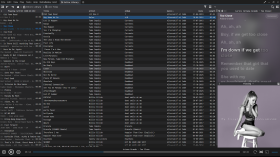
MediaMonkeyの音節歌詞
Syllable Lyricsは、MediaMonkey 5およびMediaMonkey 2024に、単語ごとのカラオケハイライト表示を同期させる機能を追加します。
特徴
- 再生と同期した単語と音節のハイライト表示
- クリック可能な時間指定ラインでシーク
- アクティブな歌詞行のスムーズな自動センタリング
- 組み込みの拡張LRCおよびTTMLワードタイミング
- 通常のLRC行タイミングとプレーンテキストフォールバック
- バックコーラスと交代歌手の配置は、提供元から提供される場合のみ有効です。
- Lyrics+対応のKPOE、Unison、LRCLIBオンライン検索
- オプションのプロバイダーまたはGoogleによるローマ字表記
- 通常モードとフルスクリーンモードで、現在のアルバムアートの背景がぼやけて表示されます。
- 設定可能なタイミングオフセット、オンライン検索、スムーズスクロール
Syllable Lyrics for MediaMonkey
Syllable Lyrics adds synchronized word-by-word karaoke highlighting to MediaMonkey 5 and MediaMonkey 2024.
FeaturesHide original
- Word and syllable highlighting synchronized with playback
- Clickable timed lines for seeking
- Smooth automatic centering of the active lyric line
- Embedded enhanced LRC and TTML word timing
- Ordinary LRC line timing and plain-text fallback
- Background vocals and alternating singer alignment when supplied by the provider
- Lyrics+ compatible KPOE, Unison, and LRCLIB online lookup
- Optional provider or Google-powered romanization
- Blurred current-album-art backgrounds in normal and fullscreen modes
- Configurable timing offset, online lookup, and smooth scrolling
By
GhosT
提出者 ghost.specialgrade
更新 08/08/2026
バージョン履歴 / 詳細
- バージョン:
- 0.1.21
- 更新:
- 08/08/2026
- Size:
- 27.51 KB
- ライセンス:
- MIT License
- 対応機種:
- Media Monkey 5.0 - 2024
- 変更点:
Syllable Lyrics v0.1.21
This release improves synchronized lyric discovery, dual-script romanization, karaoke animation, scrolling, and fullscreen presentation for MediaMonkey 5 and MediaMonkey 2024.
What’s New
- Added synchronized dual-script lyrics that preserve both original and romanized text
- Added word-by-word karaoke wipes for both scripts when aligned syllable timing is available
- Added an option to display romanized lyrics as the primary text
- Added BiniLyrics lookup with TTML word-timing support
- Improved Lyrics+, Unison, and LRCLIB parsing and provider prioritization
- Word-timed lyrics now consistently outrank line-timed and plain-text results
- Provider-supplied transliteration is preferred, with optional Google-powered romanization as a fallback
- Added background-vocal and alternating-singer presentation
- Added manual lyric scrolling with a five-second pause before automatic centering resumes
- Improved active-line depth, glow, shadows, karaoke wipes, and character animation
- Improved normal and fullscreen album-art backgrounds
- Fixed inherited fullscreen text-shadow artifacts
- Added additional parsing, provider-priority, romanization, and timing regression tests
Romanization
The original and romanized lyrics remain visible together. You can choose which script appears as the primary text.
For word-timed lyrics with aligned transliteration, both scripts share the same timestamps and receive synchronized karaoke wipes. Line-only transliteration remains visible but cannot provide a true word-by-word wipe without aligned timing.
- バージョン:
- 0.1.20
- 更新:
- 19/07/2026
- Size:
- 25.15 KB
- ライセンス:
- MIT License
- 対応機種:
- Media Monkey 5.0.0 - 5.0.0

このアドオンは、タブの閉じるボタンを、マウスをその上に置いたときにのみ表示されるように切り替えます。
Translated automatically (see original)This addon switches the tab close buttons back to only show when the mouse is hovering over them.
Hide original
By
Ventis Media, Inc.
提出者 drakinite
更新 08/12/2020