ソースによっては、複数の CD からのオーディオブックに何百ものファイルが含まれている場合があります。
各 CD には独自のトラック番号が付けられているため、アルバム全体で同じ名前のトラックが複数存在する可能性があります。
一部のオーディオ プレーヤーにとって、正しい順序を出力するのは悪夢です。
Track Entitler は、トラック番号に基づいてトラックに自動的に名前を付ける機能のみを提供します。
プロセス
- すべてのファイルに正しい順序でトラック番号が付いていることを確認してください。
- タイトルを変更するすべてのトラックを選択します。
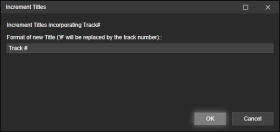
- [タグの編集] を右クリック (または [ツール] > [タグの編集]を使用) し、 [タイトルの増分]を選択します。
- 新しくタイトルを付けるトラックに追加するテキストを追加します。
文字#はトラック番号に置き換えられます。
例
追跡 #
トラック1
トラック2
トラック3
...
新月 # 102
新月 1/102
新月 102枚中2枚目
新月 102枚中3枚目
...
Depending on your source - you may have hundreds of files in an audiobook from several CDs.
Each CD its own track numbers, which means you may end up with several identically named tracks in the entire album.
A nightmare for some audio players to gifure out the correct order.Track Entitler merely offers the possiblilty to automatically name the tracks based on the track number.
Process
- Make sure all files have Track Numbers in correct, sequential order.
- Select all tracks you want re-entitled.
- Right-click Edit Tags (or use the Tools > Edit Tags), and select Increment Titles.
- Add the text that you want your newly entitled tracks to have.
The character # will be replaced by the track number.Examples
Track #
Track 1
Track 2
Track 3
...
New Moon # of 102
New Moon 1 of 102
Hide original
New Moon 2 of 102
New Moon 3 of 102
...
By
ConcernedWife
提出者 ConcernedWife
更新 08/10/2025